Installing a Dexis/Gendex New Sensor
Updated: 04/07/2026
Article #: 187
Overview
When setting up a new sensor, it must be connected to each computer individually so the system can properly recognize and register the device.
Step-by-Step Instructions
Step 1: Access Overjet Settings
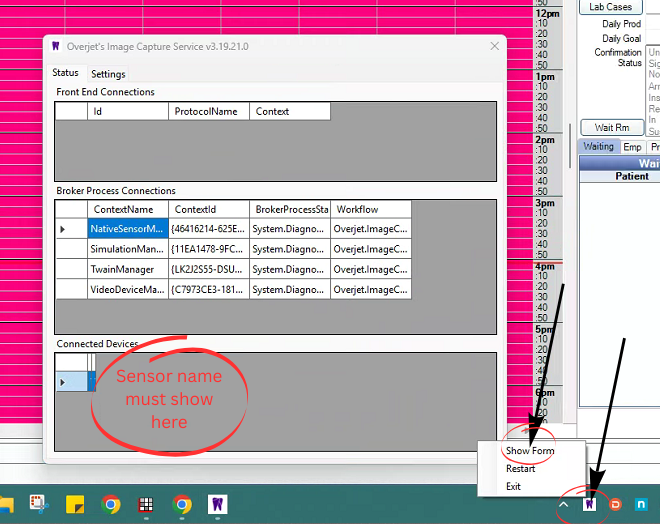
- Locate the Overjet icon in the bottom right corner of your screen (system tray).
- Right click the Overjet icon.
- Click Show Forms from the menu.
Step 2: Verify the Overjet Window
- A window titled Overjet Image Capture Service will appear.
- Navigate to the Status tab if not already selected.
Step 3: Connect the Sensor
- Plug the sensor into the computer.
- Wait for the system to recognize the device.
- This process can take anywhere from 5 minutes to 1 hour.
Step 4: Confirm Sensor Detection
- In the Connected Devices section at the bottom of the window:
- Look for the sensor name (for example, MouthWatch or Dexis). The sensor must show in the circled area in step 3
- Once the sensor name appears, the device has been successfully registered.
Step 5: Move to the Next Computer
- Disconnect the sensor from the current computer.
- Repeat Steps 1 through 4 on each additional computer.

Troubleshooting
- Ensure the sensor is securely plugged into the blue USB port on the back of the tower.
- Allow sufficient time for detection before moving to the next device.
- If the sensor does not appear after one hour, submit a ticket to the IT department for further assistance.
Notes
- Each computer must complete this process individually.
- Skipping a computer may result in the sensor not functioning properly on that device.
|
Rate this Topic:
|
|||
|
